モデルの作成
モデル形状はFreeCADで行いました。
流体側の領域(fluid)と固体側の領域(solid)を別々で作成してstlファイルとして出力します。
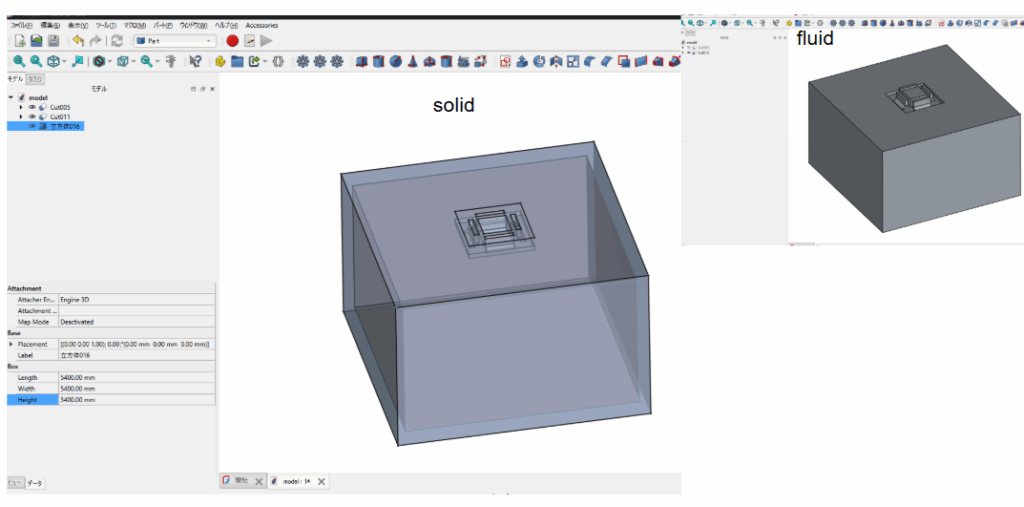
出力したstlファイルを元にメッシュ作成を行いました。
主に使用したコマンドを載せておきます。
|
1 2 3 4 5 6 7 8 9 10 11 12 13 14 |
スケール変換 surfaceConvert -scale 0.001 model/solid/solidwalls.stl constant/triSurface/solidwalls_m.stl surfaceConvert -scale 0.001 model/fluid/fluid.stl constant/triSurface/fluid_m.stl 特徴量抽出 surfaceFeatureExtract -dict system/surfaceFeatureExtractDict.solid surfaceFeatureExtract -dict system/surfaceFeatureExtractDict.fluid メッシュ作成 blockMesh snappyHexMesh -overwrite 領域分割 splitMeshRegions -cellZones -overwrite |
chtMultiRegionのマルチリージョンソルバは作り方なども癖があるので、なかなか理解ができないかもしれません。
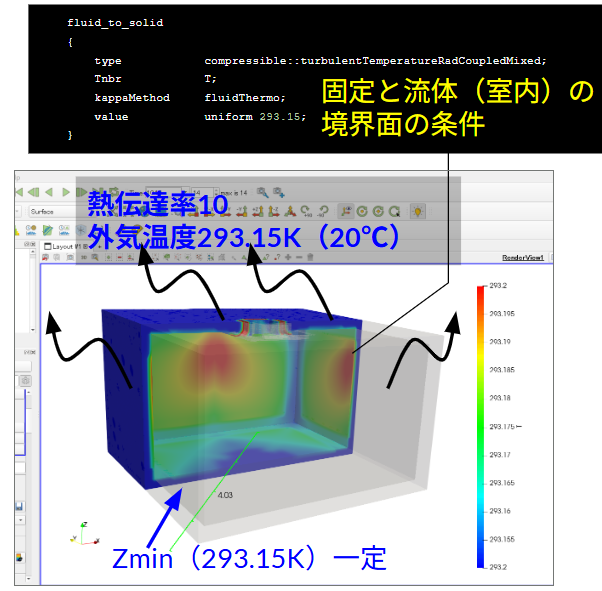
温度の境界条件としては以下のように室内は固体壁で囲まれており、その固体壁のまわりのモデル化は行っていないため、固体壁と外気は熱伝達率$10[\text{W}/\text{m}^2 \text{K}]$としています。
計算の流れ
計算の流れは前回の記事と同じです。
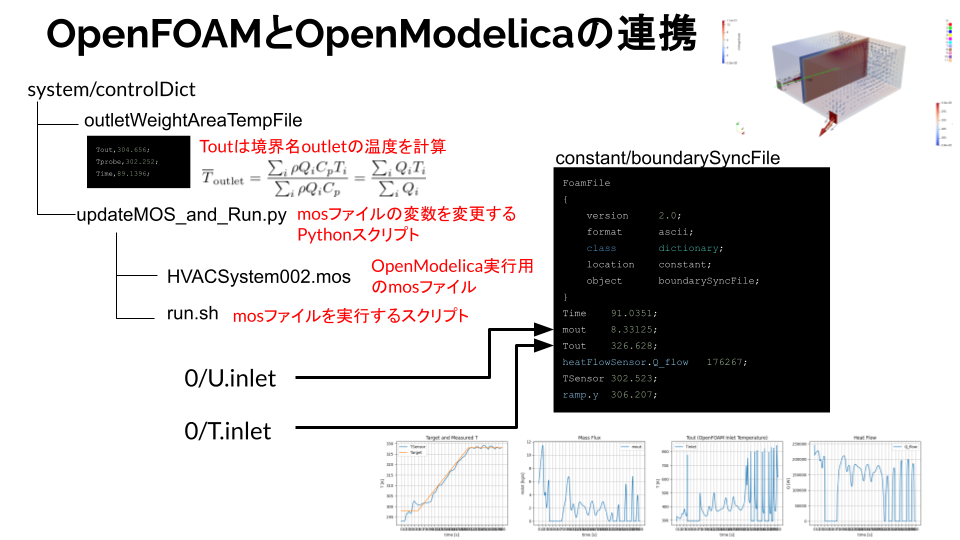
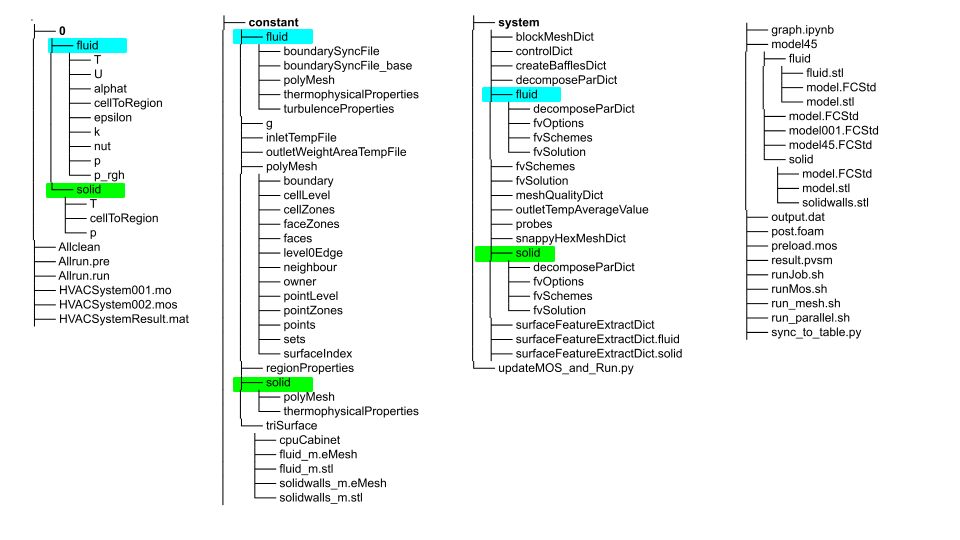
ただし今回はマルチリージョンソルバなのでフォルダ構成が少し異なります。
0, constant, systemのそれぞれのフォルダにfluid領域とsolid領域を作成する必要があります。fluid領域とかsolid領域などの名前は任意でつけることができます。
好みに応じてAir(流体領域)やwalls(固体領域)などにしても良いです。
計算毎時に実行する独自プログラム
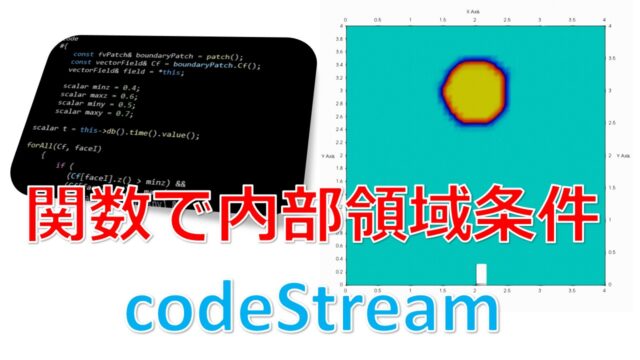
system/controlDictは計算毎時に独自のプログラムを実行するcodedという機能があります。
設定ファイルの全文を載せておきます。
system/controlDict
|
1 2 3 4 5 6 7 8 9 10 11 12 13 14 15 16 17 18 19 20 21 22 23 24 25 26 27 28 29 30 31 32 33 34 35 36 37 38 39 40 41 42 43 44 45 46 47 48 49 50 51 52 53 54 55 56 57 58 59 60 61 62 63 64 65 66 67 68 69 70 71 72 73 74 75 76 77 78 79 80 81 82 83 84 85 86 87 88 89 90 91 92 93 94 95 96 97 98 99 100 101 102 103 104 105 106 107 108 109 110 111 112 113 114 115 116 117 118 119 120 121 122 123 124 125 126 127 128 129 130 131 132 133 134 135 136 137 138 139 140 141 142 143 144 145 146 147 148 149 150 151 152 153 154 155 156 157 158 159 160 161 162 163 164 165 166 167 168 169 170 171 172 173 174 175 176 177 178 179 180 181 182 183 184 185 186 187 188 189 190 191 192 193 194 195 196 197 198 199 200 201 202 203 204 205 206 207 208 |
application chtMultiRegionFoam; startFrom latestTime; startTime 0.001; stopAt endTime; endTime 300;//21600;// 6 hours deltaT 0.001; writeControl adjustable; writeInterval 5;//600;// 10 minutes purgeWrite 0; writeFormat ascii;//binary;// writePrecision 12; writeCompression off; timeFormat general; timePrecision 6; runTimeModifiable true; maxCo 20.0;//0.9; maxDi 10.0; adjustTimeStep yes; functions { #include "outletTempAverageValue" continuityError1 { type continuityError; libs ( fieldFunctionObjects ); // Mandatory entries (unmodifiable)// Optional entries (runtime modifiable) phi phi; // Optional (inherited) entries writePrecision 8; writeToFile yes; useUserTime yes; region region0; enabled yes; log yes; timeStart 0; // timeEnd 8000; executeControl timeStep; executeInterval 1; writeControl timeStep; writeInterval 1; } residuals { type solverInfo; libs ( "libutilityFunctionObjects.so" ); fields ( ".*" ); } fieldMinMax1 { type fieldMinMax; libs ( fieldFunctionObjects ); // Mandatory entries (unmodifiable)// Mandatory entries (runtime modifiable) mode magnitude; fields ( U p T ); // Optional entries (runtime modifiable) location yes; writePrecision 8; writeToFile yes; useUserTime yes; region fluid; enabled yes; log yes; timeStart 0; // timeEnd 8000; executeControl timeStep; executeInterval 1; writeControl timeStep; writeInterval 1; } fieldMinMax2 { type fieldMinMax; libs ( fieldFunctionObjects ); // Mandatory entries (unmodifiable)// Mandatory entries (runtime modifiable) mode magnitude; fields ( U p T ); // Optional entries (runtime modifiable) location yes; writePrecision 8; writeToFile yes; useUserTime yes; region solid; enabled yes; log yes; timeStart 0; // timeEnd 8000; executeControl timeStep; executeInterval 1; writeControl timeStep; writeInterval 1; } yPlus1 { type yPlus; libs ( fieldFunctionObjects ); // Mandatory entries (unmodifiable)// Optional (inherited) entries writePrecision 8; writeToFile yes; useUserTime yes; region region0; enabled yes; log yes; timeStart 0; timeEnd 8000; executeControl timeStep; executeInterval 1; writeControl timeStep; writeInterval 100; } YMin { type surfaceFieldValue; libs ( "libfieldFunctionObjects.so" ); writeControl timeStep; log yes; writeFields no; regionType patch; name ZMax; operation sum; fields ( phi ); // Optional (inherited) entries writePrecision 8; writeToFile yes; useUserTime yes; region air; enabled yes; timeStart 0; timeEnd 8000; executeControl timeStep; executeInterval 1; writeInterval 100; } YMax { $YMin; name YMax; } //https://doc.openfoam.com/2306/tools/post-processing/function-objects/field/wallHeatFlux/ wallHeatFlux1 { // Mandatory entries (unmodifiable) type wallHeatFlux; libs (fieldFunctionObjects); // Optional entries (runtime modifiable) //patches (<patch1> ... <patchN>); // (wall1 "(wall2|wall3)"); //qr qr; // Optional (inherited) entries // writePrecision 8; // writeToFile true; // useUserTime true; region solid; // enabled true; // log true; // timeStart 0; // timeEnd 8000; executeControl timeStep; executeInterval 1; writeControl writeTime;//timeStep; writeInterval 1; } |
大事なのは#include "outletTempAverageValue";の部分です。
ここに独自のプログラムを書いておき、includeで読み込んでいます(直接記述すると煩雑になるためファイルを分けています)
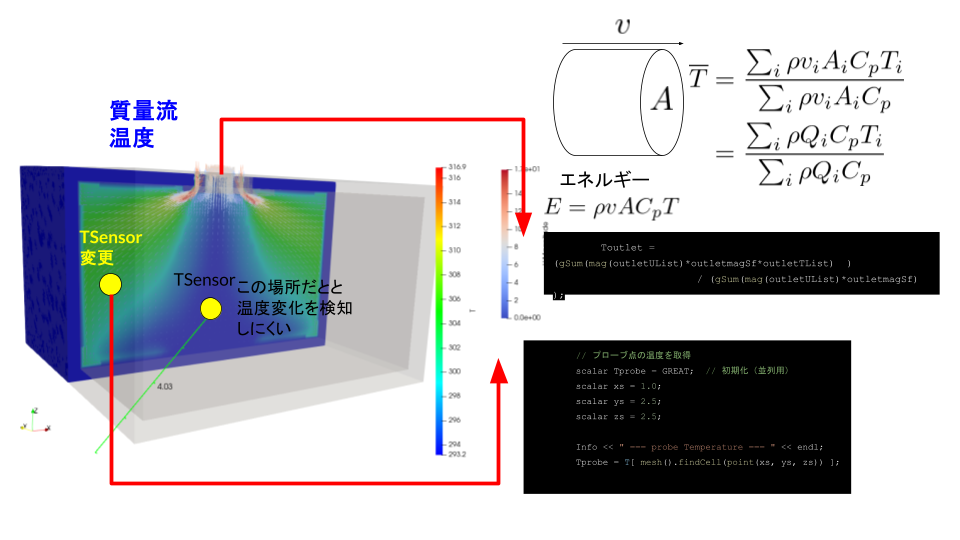
特定の境界面の温度、特定の場所の温度を取得
outletTempAverageValueの全文を載せておきます。
system/outletTempAverageValue
|
1 2 3 4 5 6 7 8 9 10 11 12 13 14 15 16 17 18 19 20 21 22 23 24 25 26 27 28 29 30 31 32 33 34 35 36 37 38 39 40 41 42 43 44 45 46 47 48 49 50 51 52 53 54 55 56 57 58 59 60 61 62 63 64 65 66 67 68 69 70 71 72 73 74 75 76 77 78 79 80 81 82 83 84 85 86 87 88 89 90 91 92 93 94 95 96 97 98 99 100 101 102 103 104 105 106 107 108 109 110 111 112 |
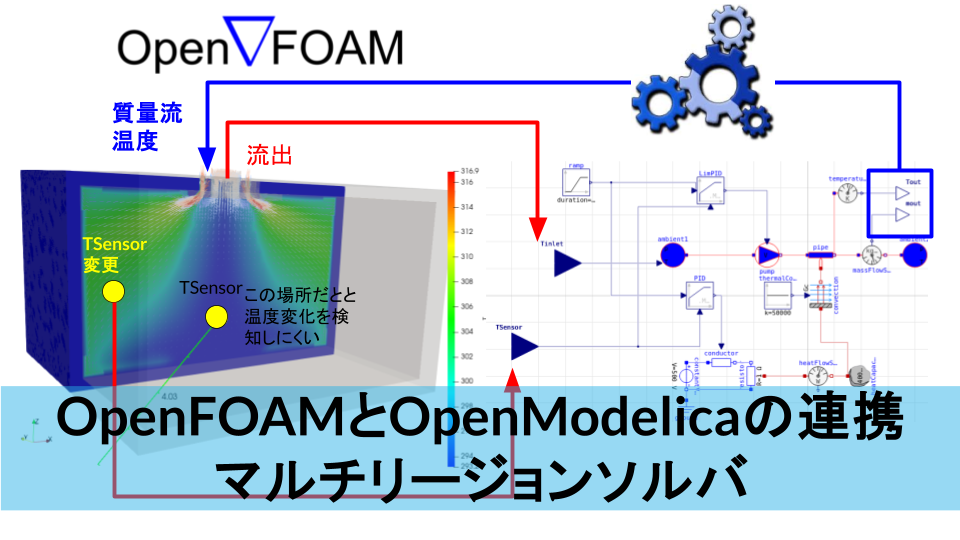
outletTempAverageValue1 { type coded; name codeTempFieldValue; libs ("libutilityFunctionObjects.so"); // 重要: どのリージョンで動かすか region fluid; // 重要: いつ実行するか enabled yes; executeControl timeStep; executeInterval 1; codeExecute #{ Info << "===== codeTempFieldValue (coded) start =====" << nl; // ---- ここから元の処理 ---- const volVectorField& C = mesh().C(); const scalarField& V = mesh().V(); word outletBoundaryName = "f-outlet"; const volVectorField& U = mesh().lookupObject<volVectorField>("U"); const volScalarField& T = mesh().lookupObject<volScalarField>("T"); // targetNameのIDの取得 const label outletID = mesh().boundaryMesh().findPatchID(outletBoundaryName); // targetNameのIDから速度場の取得 const fvPatchVectorField& outletUList = U.boundaryField()[outletID]; // targetNameのIDから温度場の取得 const fvPatchScalarField& outletTList = T.boundaryField()[outletID]; // targetNameのIDから面積ベクトルの取得 const scalarField& outletmagSf = mesh().magSf().boundaryField()[outletID]; // プローブ点の温度を取得 scalar Tprobe = GREAT; // 初期化(並列用) scalar xs = 1.0; scalar ys = 2.5; scalar zs = 2.5; Info << " === probe Temperature === " << endl; // probeT = T.internalField()[mesh().findCell(C.findNearest(point(xs, ys, zs)))]; Tprobe = T[ mesh().findCell(point(xs, ys, zs)) ]; Info << mesh().findCell(point(xs, ys, zs)) << " Tprobe = " << Tprobe << endl; Info << " === probe Temperature end === " << endl; // ================================== Start WeightAreaAverageTemp================================== // Open the file to write the results std::ofstream outletWeightAreaTempFile; outletWeightAreaTempFile.open("constant/outletWeightAreaTempFile"); if (!outletWeightAreaTempFile.is_open()) { FatalErrorIn("codeExecute") << "Cannot open outletWeightAreaTempFile file for writing!" << exit(FatalError); } scalar Toutlet; // 流出温度の計算 Toutlet = (gSum(mag(outletUList)*outletmagSf*outletTList) ) / (gSum(mag(outletUList)*outletmagSf) ); // Write the header part of the file outletWeightAreaTempFile << "Tout," << Toutlet << ";" << std::endl; outletWeightAreaTempFile << "Tprobe," << Tprobe << ";" << std::endl; outletWeightAreaTempFile << "Time," << mesh().time().timeName() << ";" << std::endl; // Close the file outletWeightAreaTempFile.close(); // ================================== End WeightAreaAverageTemp================================== // ================================== Python同期処理 Start ================================== Info << "===== Execute Python updateMOS_and_Run.py =====" << nl; // ロックファイル作成 const fileName lockFile("constant/updateMOS.lock"); { std::ofstream lock(lockFile.c_str()); if (lock.is_open()) { lock << "LOCKED" << std::endl; lock.close(); Info << "Lock file created: " << lockFile << endl; } else { FatalErrorIn("codeExecute") << "Cannot create lock file!" << exit(FatalError); } } // Pythonスクリプトの実行(同期モードでも非同期でもOK、ここでは同期で実行) const fileName pyScript("updateMOS_and_Run.py"); int ret = std::system(("python3 " + pyScript).c_str()); if (ret != 0) { Info << "Warning: Python script exited with nonzero status: " << ret << endl; } // ロックファイルが削除されるまで待機 while (Foam::isFile(lockFile)) { Info << "Waiting for Python script to finish..." << endl; Foam::sleep(0.01); // 0.01秒スリープ } Info << "Python script finished. Lock removed." << endl; // ================================== Python同期処理 End ================================ #}; } |
いろいろ書いていますが、やっているのは以下の事です。
- 流量で重みづけしたoutlet境界面の温度$\overline{T} = \frac{\sum_i \rho v_iA_i C_p T_i}{\sum_i \rho v_iA_i C_p }= \frac{\sum_i \rho Q_i C_p T_i}{\sum_i \rho Q_i C_p }$を求める。
- 座標$(1, 2.5, 2.5)$の温度を所得
- それを
constant/outletWeightAreaTempFileファイルに記述 - updateMOS_and_Run.pyのPythonファイルを実行
ただし、Pythonの実行が完全に終わるまで待機させる必要がある。事前にconstant/updateMOS.lockを作成しておき、Pythonファイルの実行が終わるとconstant/updateMOS.lockが削除される(この記述はupdateMOS_and_Run.pyに書かれている)ことでPythonの実行終了のフラグとしている。
途中作成されたconstant/outletWeightAreaTempFileは以下のような記述になる。
constant/outletWeightAreaTempFile
|
1 2 3 |
Tout,293.153; Tprobe,297.223; Time,1.21601; |
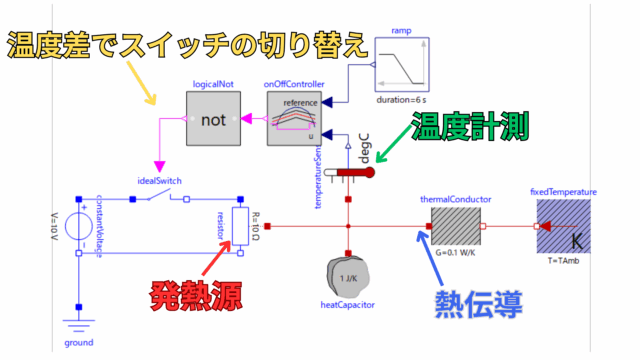
このToutとTprobとTimeはOpenModelicaの実行時に必要な変数です。








 Follow @t_kun_kamakiri